



"Data entry is just like 20 hours a week for our dispatch team." That's a direct quote from a practice manager — and it's one we hear repeatedly. Manual patient data entry slows radiology workflows at three critical touchpoints: the modality, the front desk, and the handoff between EMR and PACS. This guide covers the three fixes that eliminate re-entry at each step.
- Manual patient data entry wastes significant staff time in radiology, occurring at three critical points: the modality, the front desk, and the EMR-to-PACS handoff.
- DICOM Worklist automation eliminates tech-side entry at the scanner by pushing patient and order data from the RIS to all connected imaging devices automatically. No typing required.
- HL7 integration connects your EMR directly to OmegaAI, removing staff re-entry for both inbound orders and outbound signed reports. A single connection covers all modalities.
- The OmegaAI referring physician portal replaces fax-based order intake with structured online submissions, so patient demographics and exam codes arrive pre-populated with zero front desk re-keying.
Where Manual Data Entry Happens in a Radiology Workflow
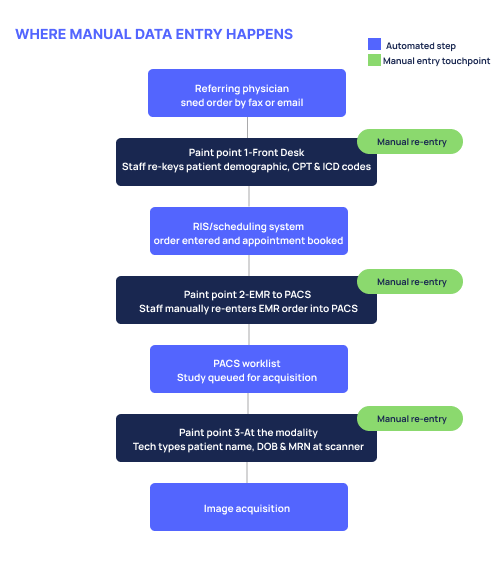
Manual patient data entry happens at three points in a typical radiology workflow:
At the modality. Before every exam, a tech types the patient's name, date of birth, and MRN directly at the scanner. It's a step that adds friction to every single study — and multiplies quickly across a high-volume day.
At the front desk. When orders arrive by fax or email, staff read them and re-key the patient information, exam type, ICD and CPT codes into the scheduling system by hand. One practice manager described it plainly: "We receive an order via email or fax, we take the patient information, date of birth, insurance, the exam, the ICD and CPT code — and Mina enters all of this."
From EMR to PACS. Orders already exist in the EMR, but staff manually re-enter them into the PACS scheduling system. Two systems holding the same information, with a person in the middle doing the connecting.
Older on-premises PACS systems often lack the integration layer needed to close these gaps. Cloud-native systems handle this natively, without custom middleware or manual workarounds.
Fix 1 — PACS Worklist Automation Stops Modality-Side Entry
DICOM Worklist automation eliminates manual entry at the modality by automatically pushing patient and order data from your RIS to the imaging device. The tech sees a populated worklist, selects the patient, and proceeds with the exam. Images link to the correct record automatically — no typing required.
One question we hear from practices exploring this for the first time: "What would the benefit be of having the EMR send orders to the PACS? I need the EMR to send the patient demographics to my DR computer." That's exactly what PACS worklist automation solves — and many practices don't realize it's already available to them.
Another common concern: "We have two ultrasound machines and a C-arm — does that mean we need three HL7 connections?" The answer is no. You do NOT need one HL7 connection per modality. A single connection to your EMR handles everything. OmegaAI® RIS populates the worklist for all connected modalities through that one integration.
For mobile and field settings, techs can access the OmegaAI DICOM Worklist from any web-capable device. The platform is browser-based and zero-footprint, so there's no software to install on a tablet or remote workstation.
Fix 2 — HL7® Integration Stops EMR-to-PACS Re-Keying
HL7® integration connects your EMR directly to OmegaAI, so orders flow automatically without staff re-entry. When an HL7 ORM message is sent from the EMR, OmegaAI receives it, populates the worklist, and the study moves forward — no staff touchpoint in between.
There are two paths worth understanding side by side:
- DICOM-only: Staff still enter orders into the RIS manually, but the worklist is populated from there — so techs at the modality no longer type at the machine. It's a meaningful improvement, even without full HL7.
- HL7-connected: Orders flow from the EMR directly into OmegaAI. Zero staff re-entry at any point in the ordering process.
Is HL7 required? No — DICOM-only works and still eliminates modality-side entry. HL7 adds full EMR PACS integration and removes the last manual step. OmegaAI supports both, and HL7 can be added later if a practice starts DICOM-only.
One detail worth making explicit: HL7 is bidirectional. The same connection that sends orders in also sends signed reports back out automatically to the EMR or referring physician portal. Without it, staff manually download the signed PDF and upload or fax it to the referring doctor. One sentence covers it: the integration closes the loop in both directions, without anyone doing it by hand.
Fix 3 — Referring Physician Portal Stops Fax Re-Keying
The referring physician portal eliminates fax re-keying by giving referring doctors a structured online form to submit orders — patient demographics and codes arrive in OmegaAI automatically.
Instead of a fax arriving at the front desk and a staff member reading and re-entering every field, referring physicians submit orders electronically through the portal. Patient demographics, exam type, CPT and ICD codes — all pre-populated in the system before anyone at your practice touches the order.
The OmegaAI referring physician portal is a native feature, not a third-party add-on. Referring physicians can also access their patients' studies and reports directly through the same portal, which closes the referral loop on both ends. The Blume® patient engagement & image sharing solution works alongside this, giving patients their own secure access to studies and reports — further reducing front desk coordination for record requests and sharing.
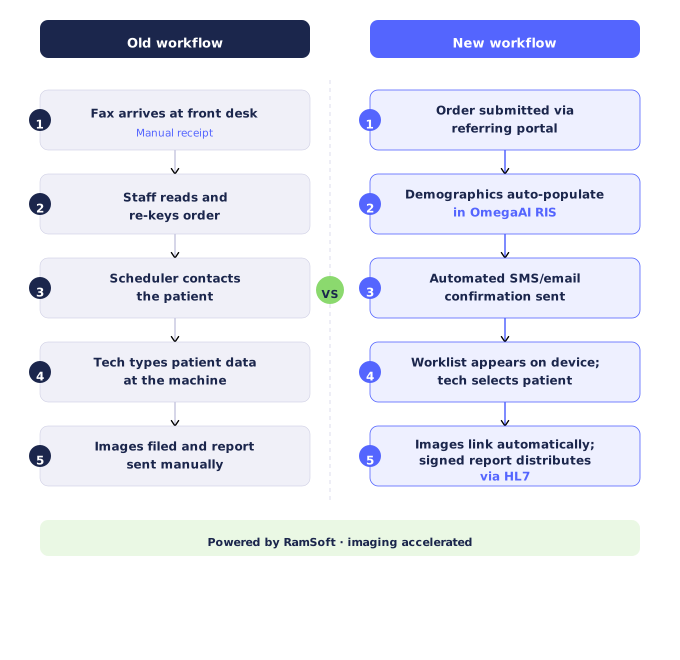
Before and After — What Your Workflow Looks Like
FAQs about Manual Data Entry in Radiology Workflows
Can I stop manually entering patient data in radiology?
Yes. DICOM Worklist automation pushes patient and order data from your RIS directly to the imaging device, so techs select from a populated list instead of typing. Combined with HL7 integration and a referring physician portal, manual re-entry can be eliminated at every major touchpoint in the workflow.
Do I need HL7 to eliminate manual data entry at the modality?
No. DICOM-only integration is enough to stop manual tech entry at the scanner. HL7 goes further by automating the order flow from your EMR into the RIS, removing the last remaining staff re-entry step. OmegaAI supports both, and you can add HL7 later.
How does a PACS worklist auto-populate patient demographics?
When an order is created in the RIS — either manually or via an HL7 message from the EMR — OmegaAI sends that order data to connected modalities through DICOM Modality Worklist (MWL). The tech sees the scheduled patient on the device screen and selects the record. No typing required.
Can a PACS capture patient information from incoming faxes or emails?
OmegaAI supports inbound fax-to-order conversion as an optional add-on license. The referring physician portal is the primary path for structured, staff-free order intake — referring doctors submit orders directly, and all fields populate automatically without staff re-entry.
See how OmegaAI connects your EMR, RIS, and every imaging device — so your team stops re-entering the same patient data three times.
No manual entry at the modality. No fax re-keying at the front desk.