



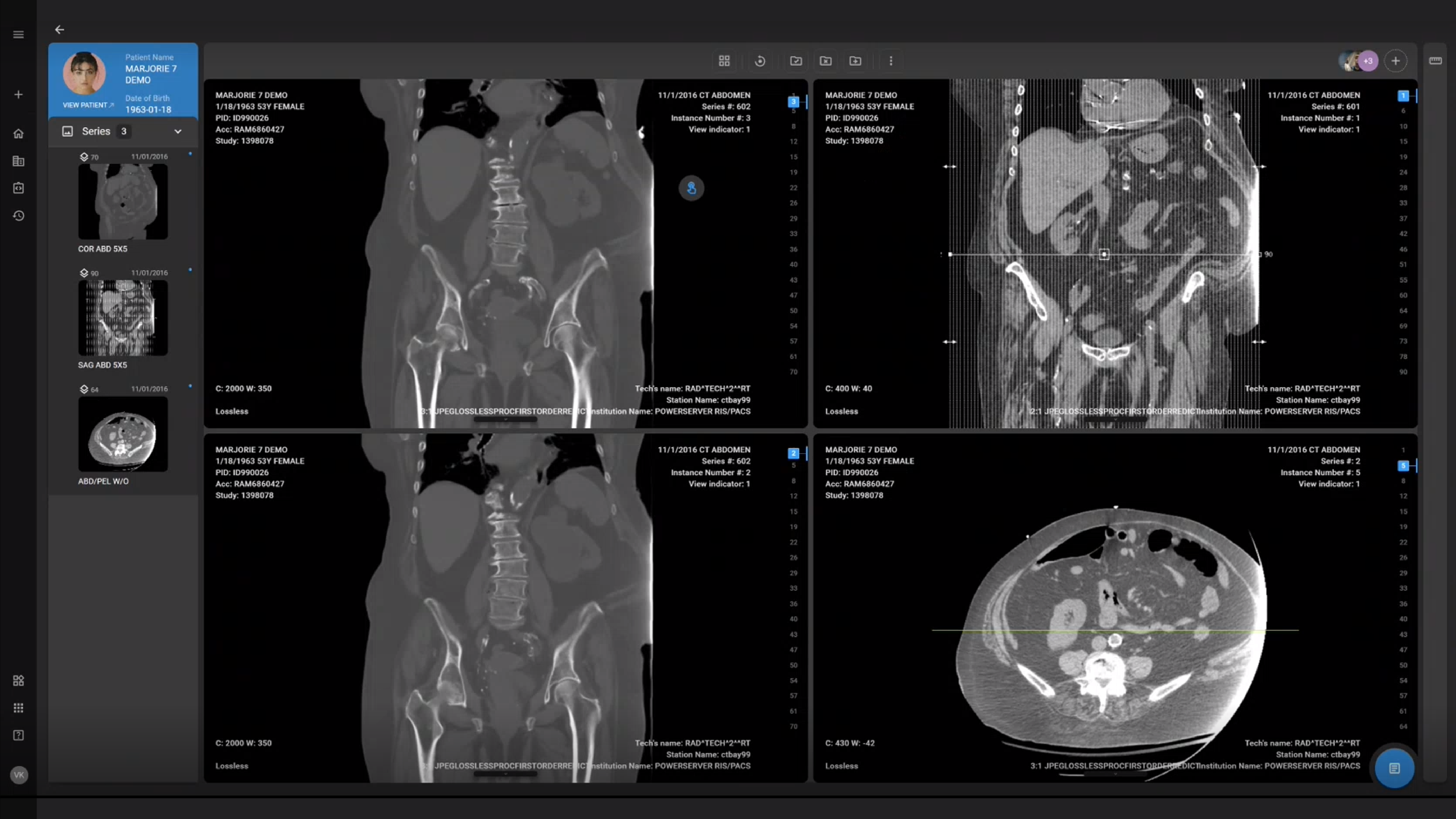
Managing the increasing volume of medical imaging data is a significant challenge for radiology practices aiming to maintain high efficiency and accuracy. PACS radiology software has become a vital tool in tackling this challenge, offering solutions that enhance data management, improve diagnostic workflows, and provide seamless access to images and reports. In this blog, we'll explore the latest advancements in PACS radiology software, highlight the benefits it brings to your practice, and offer insights on selecting the ideal system to meet your specific needs.
- Modern PACS radiology software uses cloud-based, DICOM-compliant imaging to improve storage, access, and collaboration across radiology teams.
- AI, advanced visualization, and 3D tools help radiologists detect findings faster and improve diagnostic accuracy.
- Cloud-native PACS integrated with RIS/EHR streamlines workflows, enables remote reading, and strengthens security and compliance.
- OmegaAI® unifies PACS, RIS, and VNA into one scalable platform with automation and analytics to support high-volume imaging practices.
Understanding PACS Radiology Software
What is PACS Radiology Software?
Picture Archiving and Communication System (PACS) is essential software that radiologists use to store, retrieve, manage, and interpret medical imaging data. PACS replaces traditional film-based methods, allowing for digital storage and easy sharing of images like X-rays, MRIs, and CT scans.
Modern PACS solutions enhance diagnostic workflows and are integrated with other radiology systems such as RIS (Radiology Information Systems) to offer seamless communication across healthcare teams. Traditionally PACS systems were based on servers located “on premise” but now are frequently available os hosted solutions in the cloud, allowing for unlimited access, expandability, reliability and security. In addition, there is a significant reduction in the need for additional on-site IT staffing to manage the on-premise servers and infrastructure.
Key Features of Advanced PACS Software
Image Viewing and Storage: PACS radiology software provides robust DICOM-compliant archiving for secure, high-quality image storage and fast retrieval. Radiologists can use customizable layouts and multi-monitor support, allowing them to view and analyze images efficiently, enhancing diagnostic accuracy.
Image Manipulation & Markup Tools: Advanced image analysis tools such as Standard Uptake Values (SUVs) for PET/CT scans, multiplanar reconstruction (MPR), and PET/CT fusion mode with color mapping selector provide radiologists with more accurate, detailed visualizations. These tools allow for evaluation of images from different planes and modalities, offering deeper insights into complex cases. Additionally, the Plumb Line Markup Tool aids in the assessment and alignment of anatomical structures, and CT/MR cine image review enhances dynamic study analysis. Combined with specialized measurements like the Cardio Thoracic Ratio (CTR) Tool, these capabilities significantly improve diagnostic precision and patient outcomes by equipping radiologists with powerful tools to interpret imaging data more effectively.
Dictation Tools: Integrated AI-powered transcription functionality helps streamline the process of report generation, allowing radiologists to dictate reports quickly and accurately. The AI transcription solution automatically converts spoken words into text, minimizing errors and reducing the need for manual editing. This seamless integration enables radiologists to create and share reports more efficiently, improving workflow and ensuring timely delivery of diagnostic information.

Patient Management and Billing: PACS integrates seamlessly with patient management and billing systems, offering access through either the same worklist or a dedicated billing module. This flexibility streamlines administrative tasks, reduces manual workload, and enhances overall productivity for healthcare providers.
Scheduling and Patient Portals: With scheduling tools built into PACS, appointment management becomes more streamlined. Additionally, patient portals provide patients with access to their imaging results and reports, fostering better communication and engagement.
Workflow Automation: PACS improves operational efficiency by automating repetitive tasks like image retrieval and processing. This automation reduces the time radiologists spend on administrative tasks, allowing them to focus on patient care.
Integration Capabilities: Radiology Software integrates seamlessly with other healthcare systems such as EHRs and RIS, ensuring smooth communication and data exchange across departments. Compliance with standards like HL7 and FHIR further enhances its interoperability.
Security Features: PACS prioritizes data security with HIPAA compliance and multi-factor authentication (MFA), protecting sensitive patient information from unauthorized access.
Interactive Documents: PACS allows radiologists to link and attach additional information to reports, enhancing clarity and collaboration with referring physicians. This capability also facilitates seamless connection of patient workups across multiple specialties, improving coordinated care.
Scalability and Customization: PACS offers cloud based or cloud-native architecture, enabling seamless growth for medical practices without compromising system performance. Customizable workflows and user interfaces ensure the software adapts to the unique needs of each department.
Access Anytime, Anywhere: The biggest advantage of a cloud-based PACS is accessibility. Radiologists and healthcare providers can securely access images and reports anytime, from any location, enabling faster diagnoses and more flexible workflows, even in remote or mobile settings.
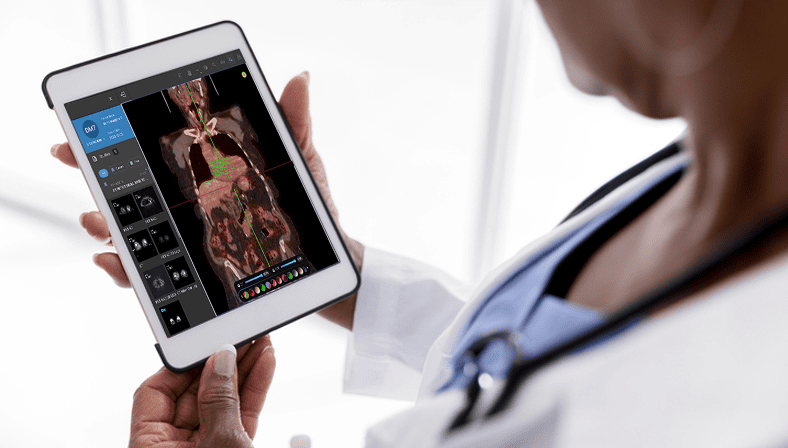
OmegaAI combines all these features into a comprehensive imaging data management solution, designed to meet the evolving needs of radiology practices. By integrating advanced RIS (Radiology Information System) and VNA (Vendor Neutral Archive) capabilities, OmegaAI offers much more than traditional PACS. From advanced image analysis tools to secure, cloud-native storage and seamless system integration, OmegaAI ensures your radiology department operates efficiently, accurately, and securely, providing a complete platform for managing imaging data across departments.
Importance of PACS in Radiology Practices
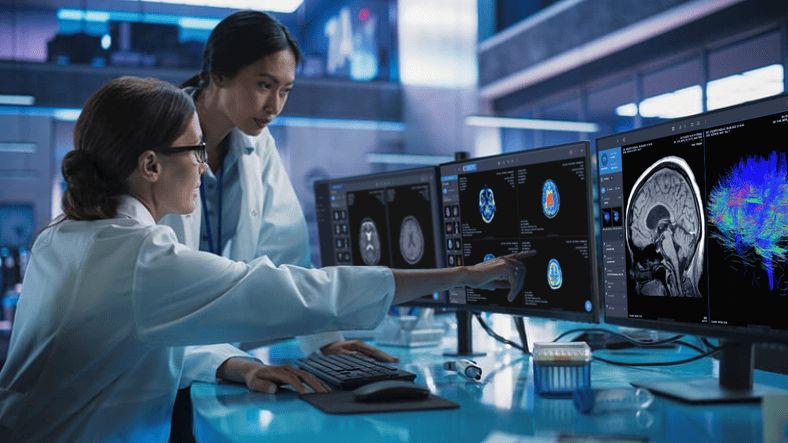
PACS plays a key role in modern radiology by improving how imaging data is stored, accessed, and shared. It allows radiologists to efficiently manage large volumes of medical images through secure, digital archiving, enabling quick retrieval and better collaboration with healthcare providers. By integrating with other hospital systems, PACS supports seamless workflows, reducing delays in diagnosis and treatment. Its advanced image manipulation tools help improve diagnostic accuracy. In addition to enhancing efficiency, PACS ensures compliance with regulatory standards, safeguarding sensitive patient data and contributing to better patient outcomes.
Latest Advancements in PACS Radiology Software
Generative AI and Multi-Modal AI in PACS
Generative AI is emerging as a meaningful advancement within PACS radiology software, extending beyond image-level detection toward clinical synthesis and workflow support. Within the PACS environment, generative models can assist radiologists by organizing complex reports into concise summaries, supporting structured report generation, and reducing repetitive documentation effort. Prior imaging is compared and identifies trends over time. This capability becomes increasingly important as imaging volumes rise and diagnostic cases grow more complex across modalities and subspecialties.
Multi-modal AI further strengthens this approach by combining imaging data with contextual information from EHR systems, prior studies, and clinical notes. Instead of interpreting images in isolation, radiologists are supported with a more comprehensive diagnostic context that reflects longitudinal patient history. This integrated view improves prioritization, supports more consistent interpretation, and helps reduce cognitive load in high-volume reading environments where speed and accuracy must be balanced.
For AI to deliver real operational value in radiology, it must be embedded directly into existing RIS and PACS workflows rather than operating as a standalone layer with a separate worklist that introduces additional steps. Imaging organizations are increasingly seeking platforms that use RamSoft’s integrated AI radiology workflows, where generative and multi-modal AI are built directly into RIS and PACS to allow for smooth automation, organized results, and support for decisions from taking images to reporting. This integration-first approach allows radiology teams to scale AI adoption responsibly while maintaining efficiency, diagnostic confidence, and clinical control across the care continuum.
Cloud-Native and Hybrid Cloud PACS Adoption
Radiology organizations are increasingly shifting away from traditional “lift-and-shift” PACS deployments toward cloud-native architectures designed specifically for scale, resilience, and performance. Cloud-native PACS platforms, such as OmegaAI, enable elastic storage, faster updates, and improved disaster recovery without the operational burden of on-premise infrastructure.
Many enterprises are also adopting hybrid cloud models that balance low-latency local performance with centralized cloud storage to manage costs and regulatory requirements. This architectural flexibility allows imaging providers to scale intelligently while maintaining consistent performance for advanced visualization, remote reading, and distributed care workflows.
Structured Reporting Automation
Structured reporting automation is becoming a critical advancement in modern PACS platforms. AI-driven tools now convert free-text dictation into structured, coded reports aligned with clinical standards. This improves report consistency, reduces variability, and enables downstream data analytics, quality measurement, and precision medicine initiatives. By adding structured reporting directly into the PACS workflow, radiology teams can speed up their work and create data that is simpler to search, analyze, and share across different systems. This shift supports both operational efficiency and long-term clinical insights.
Specialty PACS Market Trends
Growth in specialty PACS is accelerating as imaging subspecialties demand workflows tailored to their unique clinical requirements. Breast imaging, cardiology, orthopedics, and oncology increasingly rely on advanced AI tools, analytics, and cloud integration to manage complex studies and high data volumes. Specialty PACS platforms leverage AI-assisted measurements, advanced visualization, and modality-specific protocols to improve diagnostic confidence. Cloud-based deployment further enables collaboration across sites and subspecialists, supporting distributed care models while maintaining consistency, security, and performance across the enterprise.
Operational AI and Worklist Intelligence
Operational AI embedded within PACS radiology software is reshaping how imaging studies are prioritized, routed, and interpreted in high-volume clinical environments. Rather than focusing solely on image detection, these AI and machine learning models support real-time workflow intelligence by analyzing study attributes, historical imaging patterns, and available clinical context to alert critical findings for triage. This enables radiology teams to move beyond traditional first-in, first-read workflows and focus attention on cases that require more immediate clinical review.
AI systems are particularly effective at identifying imaging patterns and anomalies and are learned over time, that may be difficult to recognize consistently through manual review alone. This capability can support earlier detection of certain conditions, including cancer, where subtle imaging differences may significantly influence diagnostic timing and downstream clinical decisions.
Unlike early computer-aided detection systems introduced in the 1990s, modern AI models continuously improve by learning from large and diverse imaging datasets. Within PACS, these tools assist with operational tasks such as worklist prioritization, abnormality flagging, and preliminary study categorization. By automating routine steps and reducing manual sorting, operational AI helps lower cognitive workload for radiologists, supports faster turnaround times, and enables greater focus on complex interpretation and clinical decision-making, ultimately contributing to more consistent and reliable diagnostic workflows.
Enhanced Image Processing and Analysis
Recent advancements in image processing and analysis have significantly improved the capabilities of PACS radiology software. Radiologists now benefit from enhanced visualization tools that allow for more precise measurements and detailed image manipulation. Features like line and angle measurement, region of interest (ROI) annotations, and 3D reconstructions give healthcare professionals a more comprehensive view of patient anatomy without additional imaging leading to better-informed diagnoses.
Advanced algorithms now enable clearer image enhancements by adjusting contrast, brightness, and sharpness, helping radiologists discern details that were previously difficult to identify. In addition, PET/CT image fusion allows the combination of different imaging techniques, such as MRI and CT scans, to provide a holistic view of the patient's condition. This cross-modality capability has improved diagnostic accuracy, especially in complex cases where one imaging technique may not be sufficient.
As image processing tools become more sophisticated, radiologists are empowered to interpret images faster and with higher confidence. These advancements not only expedite the diagnostic process but also help healthcare providers make more informed treatment decisions, ultimately improving patient care outcomes.
Improved Data Management and Accessibility
PACS radiology software has greatly advanced in terms of data management and accessibility, making it easier for healthcare providers to store, retrieve, and share medical images. Cloud-based solutions have become a cornerstone of modern PACS, offering scalable storage options that reduce the need for on-site hardware. These systems ensure medical images and related data are always accessible to authorized users, whether they are in the same facility or across the globe.
In terms of accessibility, PACS systems now provide seamless integration with other healthcare platforms, such as electronic health records (EHRs) and radiology information systems (RIS). This interoperability enables smoother workflows, as radiologists and physicians can access patient records, reports, and images from a single interface. Improved mobile access has allowed healthcare providers to view images and reports from virtually anywhere, making remote consultations and telemedicine more feasible than ever.
The shift towards cloud-native PACS platforms has also enhanced security and compliance with regulations like HIPAA. These systems ensure that sensitive medical data is protected while offering real-time access to authorized personnel. Ultimately, improved data management and accessibility help radiology practices operate more efficiently, ensuring faster and more accurate patient care.
The implementation of advanced PACS radiology software brings numerous benefits to healthcare facilities, particularly in enhancing efficiency, improving diagnostic accuracy, and optimizing patient management. These advancements not only improve daily radiology operations but also ensure better patient care, faster results, and more seamless collaboration among healthcare providers. Below are the key benefits of using advanced PACS in radiology.
Streamlined Workflow and Efficiency
One of the greatest benefits of advanced PACS software is the ability to streamline radiology workflows, to manage relentless volumes of studies. Traditional film-based imaging systems often involve long delays in the retrieval and sharing of medical images, but PACS eliminates these issues through digital storage and instant access to images. This allows radiologists and healthcare teams to review images quickly, significantly reducing waiting times for both patients and doctors.
PACS automates routine tasks such as image sorting, and retrieval, freeing up valuable time for radiologists to focus on patient diagnoses and treatment planning. The integration of PACS with other hospital systems like RIS and EHR further improves the flow of information.
This streamlined workflow leads to faster diagnoses, improved communication among healthcare teams, and a reduction in administrative overhead. As a result, healthcare facilities can serve more patients, reduce costs, and provide better care in a timely manner.
Increased Diagnostic Accuracy
Advanced PACS radiology software significantly enhances diagnostic accuracy, which is crucial for ensuring the best patient outcomes. With features like high-resolution imaging, multi-modality support, and advanced image manipulation tools, PACS allows radiologists to interpret radiological images with a higher level of detail and precision. These tools enable more accurate measurements, clearer visualizations, and the ability to highlight specific areas of concern using annotations.
The integration of artificial intelligence (AI) and machine learning into PACS platforms further boosts accuracy by assisting radiologists in detecting abnormalities that may be difficult to identify manually. AI-powered algorithms can analyze large volumes of imaging data quickly, identifying patterns and anomalies that might otherwise be overlooked. This not only aids in early detection of diseases but also helps reduce human error, leading to more confident diagnosis.
The software supports multi-modality imaging, allowing radiologists to compare and cross-correlate radiological images from different sources, such as CT, MRI, and X-rays. This comprehensive view of a patient's condition leads to better-informed treatment decisions, ultimately improving the quality of care provided.
Better Patient Management

Advanced PACS software enhances patient management by improving the way imaging data is handled and shared. With digital storage and easy retrieval of medical images, healthcare providers can access a patient’s entire imaging history within seconds, enabling faster decision-making and more coordinated care. This accessibility reduces delays in treatment and allows for more timely interventions, especially in critical cases, thereby increasing patient satisfaction through prompt care.
PACS systems also integrate seamlessly with patient portals, giving patients the ability to view their medical images and reports online. One such solution is the Blume® Patient Portal, which empowers patients to access their imaging results easily, fostering transparency and trust. By utilizing the Blume Patient Portal, individuals can request appointments, receive notifications, and communicate securely with their healthcare providers. This transparency fosters better patient satisfaction and engagement, as patients take a more active role in managing their own health. Providing patients with easy access to their diagnostic imaging and imaging reports reduces the need for physical copies of images (like CDs), saving time and resources for both patients and healthcare providers.
Selecting High-Quality PACS Radiology Software
Choosing the right PACS radiology software for your healthcare facility is a critical decision that impacts diagnostic accuracy and quicker results. With a wide range of options available, selecting the best PACS system requires careful consideration of key criteria and an in-depth evaluation of vendors and scalable solutions. Below are the key factors to consider when making this important decision.
Key Criteria for Selection
When selecting high-quality PACS radiology software, it’s important to focus on several key criteria to ensure the system meets your facility’s needs. First, image viewing and storage capabilities are crucial. The PACS system should support DICOM-compliant storage and offer fast, reliable image retrieval to streamline radiology workflows. Look for advanced image manipulation tools like region of interest (ROI) annotations, image fusion, standard uptake values, and 3D reconstructions to enhance diagnostic precision.
Scalability is another vital consideration. As your healthcare practice grows, the PACS system must be able to accommodate more users, images, and departments without performance degradation. A cloud-native architecture is often preferred for its flexibility and scalability. Interoperability is also key, as the PACS system needs to integrate seamlessly with existing hospital information systems (HIS), electronic health records (EHR), and radiology information systems (RIS) to ensure smooth data exchange across departments.
Finally, prioritize security and compliance. The PACS software must adhere to regulatory standards such as HIPAA, protecting sensitive patient information. Multi-factor authentication (MFA) and encryption protocols should be standard features, ensuring robust data protection.
For a scalable, secure, and fully integrated PACS solution, explore OmegaAI. With advanced imaging tools and cloud-native architecture, OmegaAI is designed to meet your growing needs while enhancing patient care and compliance. Request a demo today!
Evaluating Vendors and Solutions
Once you’ve established the key criteria for PACS selection, the next step is evaluating potential vendors and solutions. Start by researching vendors with a solid reputation and proven experience in the healthcare industry. Look for vendors that have successfully implemented PACS systems in similar-sized facilities and offer ongoing technical support and training. Vendor reliability is critical, as long-term support is essential for software updates, troubleshooting, and adapting to new technology needs.
Use this checklist to guide your PACS vendor evaluation:
- Implementation Expertise: Does the vendor have experience deploying PACS in facilities like yours?
- User Experience: Is the system intuitive for radiologists, administrative staff, and other users?
- Customization: Can the PACS be tailored to fit your facility's workflow?
- Support & Training: Does the vendor offer comprehensive onboarding and 24/7 support?
- Interoperability: Can the PACS integrate with your existing EHR, RIS, and other systems?
- Scalability: Will the PACS scale as your practice grows without performance degradation?
- Security & Compliance: Does the system meet security standards, such as HIPAA?
- Transparent Pricing: Is the total cost of ownership clear, without hidden fees?
Assess the total cost of ownership (TCO), including initial software costs, maintenance fees, and potential future updates. Finally, read customer reviews and ask for references.
With over 30 years of experience, RamSoft ensures secure, customizable, scalable, and efficient imaging operations. As Drew Godde, Co-founder of Premier Radiology attests:
“RamSoft's adaptability and nimble support have been crucial in helping us grow from 50 to over 7,000 patients a day.”
Ready to transform your radiology practice? Book a demo today to see how RamSoft can elevate your imaging capabilities and support your growth.
Implementing Advanced PACS Radiology Software
Planning and Preparation
Comprehensive Assessment
- Analyze current imaging workflows to identify inefficiencies.
- Ensure network infrastructure supports PACS, including data security and performance.
- Assess integration needs with existing systems like EHRs to streamline workflows.
- Consider future scalability and the volume of imaging data for long-term storage.
Clear Objectives
- Set implementation goals (e.g., improving diagnostic efficiency, reducing film costs, enhancing collaboration).
- Prioritize performance metrics (KPIs) to measure success post-implementation.
- Involve key staff members such as radiologists, IT personnel, and department heads to gather input and ensure alignment.
Phased Rollout
- Minimize workflow disruptions by planning installation, testing, and deployment in stages.
- Establish clear timelines for each rollout phase to stay on track.
- Run a pilot with a smaller department to identify any issues before full-scale deployment.
Prepare for Challenges
- Develop a strategy for migrating patient imaging data while maintaining integrity.
- Plan for potential system downtime and prepare contingency measures to ensure continuity of patient care.
- Ensure there’s a buffer in the budget to address unexpected issues like infrastructure upgrades or delays.
Training and Support for Staff
Customize training for different user groups
- Radiologists: Focus on image manipulation tools, reporting features, and advanced functionalities.
- Technicians: Train on system navigation, image retrieval, and storage management.
- Administrative Staff: Teach scheduling, patient management, and report access.
Start training before system launch
- Pre-launch sessions allow staff to familiarize themselves with the platform before going live.
- Provide hands-on practice to ensure that staff can perform their daily tasks confidently within the new system.
Ensure ongoing support post-launch
- Set up a 24/7 vendor-provided support system for quick issue resolution, particularly during the early stages of adoption.
- Offer long-term training programs to ensure staff remain proficient as new features and updates are introduced.
By customizing training for each user group and starting early, staff can smoothly transition to the new PACS system. Hands-on practice ensures they are comfortable with their tasks before the system goes live. Continuous post-launch support and ongoing training keep the team up to date with any new features, enhancing long-term proficiency. With these steps, healthcare facilities can ensure a successful PACS implementation while maintaining staff efficiency and confidence.
“RamSoft's training is quick and user-friendly; our staff, even those without a medical background, were able to pick it up within a day,”
Miranda Polselli, Chief Operating Officer at 3D Mobile Mammography.
Book a demo today to discover how RamSoft’s intuitive, accessible solutions, backed by 24/7 support, can enhance your facility’s operations and empower your radiology team to perform at their best from day one.
Challenges and Solutions in PACS Software Implementation
Common Challenges
One of the main challenges in implementing PACS software is ensuring interoperability between existing medical devices and software from different vendors. Integrating PACS with EHR, RIS, and other hospital systems can be complex, especially when data exchange needs to occur seamlessly. Another challenge is the need for IT infrastructure upgrades to support the new system, which can be both costly and time-consuming.
Data migration also poses risks, particularly when transferring large volumes of historical imaging data while maintaining data integrity and accuracy. Training staff to use the new system in high-volume environments can be difficult, as finding time for comprehensive training while maintaining operations is a balancing act. Finally, continuous technical support is essential to address issues that arise after implementation, ensuring minimal disruption to daily operations.
Strategies to Overcome Them
To overcome these challenges, comprehensive planning is essential. Start by developing a detailed implementation roadmap that covers the project’s scope, timeline, budget, and necessary resources. Collaborating closely with the PACS vendor is also crucial to ensuring compatibility with existing systems and leveraging their expertise during integration.
A strong data migration strategy should be implemented, including rigorous testing and validation to ensure that all patient records are accurately transferred. Extensive training must be provided to staff, with ongoing support to help them adjust to the new system. A phased rollout is another effective strategy, as it allows for gradual adjustments, reducing the risk of major disruptions during the transition. Finally, continuous monitoring of the system’s performance and gathering user feedback ensures that issues are addressed promptly, optimizing long-term efficiency.
With RamSoft's 24/7 support, your healthcare facility can navigate these challenges seamlessly. Our dedicated team ensures that everything runs perfectly, from data migration to training, making sure your PACS implementation is smooth and efficient. Talk to with an Expert
FAQs About PACS Radiology Software
Why does structured reporting matter in PACS today?
Structured reporting improves consistency, clarity, and data usability in radiology. By converting narrative dictation into standardized, coded formats, PACS systems enable better data mining, quality reporting, and clinical analytics. This structure supports precision medicine initiatives and improves communication with referring physicians.
How does PACS improve radiology workflows?
PACS streamlines radiology workflows by enabling instant access to imaging studies, automating routine tasks, and integrating seamlessly with RIS and EHR systems. This reduces manual effort, accelerates interpretation, and allows radiologists to focus on diagnostic decision-making rather than administrative work.
How are advanced visualization tools changing radiology workflows?
Advanced visualization tools such as 3D reconstruction, image fusion, and multi-planar analysis allow radiologists to interpret complex anatomy more efficiently. These capabilities reduce the need for repeat imaging and support faster, more confident diagnoses, especially in complex or multi-modality cases.
What advancements are being made in PACS security?
Modern PACS platforms emphasize cloud-grade security with encryption, role-based access, and multi-factor authentication. Cloud-native architectures also improve resilience through redundancy and automated backups, helping imaging organizations meet HIPAA and regulatory requirements while maintaining continuous system availability.